15 Best Free Video Websites for High-Quality Stock Footage (2026 Guide)
Introduction
Free stock video websites have become essential tools for creators, marketers, and businesses in 2026. Whether you're producing YouTube videos, social media content, advertisements, or website visuals, high-quality stock footage can save time, reduce costs, and elevate production value.
Instead of filming everything yourself, you can access thousands of ready-to-use clips—often in HD or 4K—completely free.
Key benefits of using free stock footage:
Save production time and cost
Access professional-quality visuals
Scale content creation faster
Enhance storytelling and engagement
How to Choose the Best Free Stock Video Websites
Not all free video platforms are equal. Choosing the right one depends on your needs.
Licensing
Royalty-free: Pay once or free, reuse multiple times
Copyright-free: No ownership restrictions (rare)
Commercial Use
Always verify if clips can be used in:
Ads
Monetized YouTube videos
Business websites
Attribution
Some platforms require credit, others don’t. Prefer:
“No attribution required” for convenience
Video Quality
HD (1080p): Standard use
4K: Best for professional content
8K: Premium use cases
File Format
Common formats:
MP4 (most compatible)
MOV (higher quality, larger size)
15 Best Free Video Websites for High-Quality Stock Footage
1. Pexels Videos
Large library of free HD & 4K clips
No attribution required
Great for social media and websites
2. Pixabay Videos
Videos, images, and music in one platform
Free for commercial use
Wide category selection
3. Mixkit
Curated high-quality clips
Simple licensing
Ideal for creatives
4. Videvo
Free + premium options
Some clips require attribution
Includes motion graphics
5. Coverr
Designed for website backgrounds
No sign-up required
Minimalist collection
6. ISO Republic
Artistic and cinematic clips
No copyright restrictions
Limited but unique content
7. Splitshire
Unique creator-driven footage
Free for commercial use
Great for storytelling
8. Videezy
Free HD video clips across multiple categories
CC0 license (no attribution required)
Includes lifestyle, nature, business, and abstract footage
9. Motion Places
Travel-focused footage
High-quality visuals
Great for vloggers
10. Dareful
4K nature footage
Requires attribution
High production quality
11. Mazwai
Handpicked cinematic clips
Creative Commons license
Artistic focus
12. Production Crate
Thousands of VFX assets (explosions, fire, particles, etc.)
HD and professional-grade footage
Includes sound effects, textures, and templates
13. NatureStock
Free nature-focused video clips
No attribution required (in most cases)
Great for calming, cinematic visuals
14. Ignite Motion
Free HD footage
Simple licensing
Growing collection
15. Vidsplay
Weekly updated clips
Free with attribution
Wide variety
Comparison Table of Free Stock Video Websites
| Website | Resolution | Commercial Use | Attribution | Best For |
|---|---|---|---|---|
| Pexels | HD/4K | Yes | No | General use |
| Pixabay | HD/4K | Yes | No | All-in-one |
| Mixkit | HD | Yes | No | Creators |
| Videvo | HD/4K | Yes | Sometimes | Motion graphics |
| Coverr | HD | Yes | No | Websites |
| Dareful | 4K | Yes | Yes | Nature |
How to Use Free Stock Videos Effectively
Editing Tips
Trim unnecessary parts
Combine multiple clips for storytelling
Add music and transitions
SEO Optimization
Use videos in blog posts
Optimize file names and metadata
Add captions and descriptions
Social Media Best Practices
Keep videos short and engaging
Use vertical formats for mobile
Add subtitles
Common Mistakes
Using overused clips
Ignoring licensing
Poor editing quality
Best Tools to Edit and Process Stock Videos
After downloading stock footage, processing is essential.
Essential Tasks
Trim, split, and merge clips
Convert formats (MP4, MOV, AVI)
Compress videos for faster loading
Optimize resolution and quality
Recommended Tool: Linraw doVideo
If you need a lightweight all-in-one solution, Linraw doVideo is a practical choice.
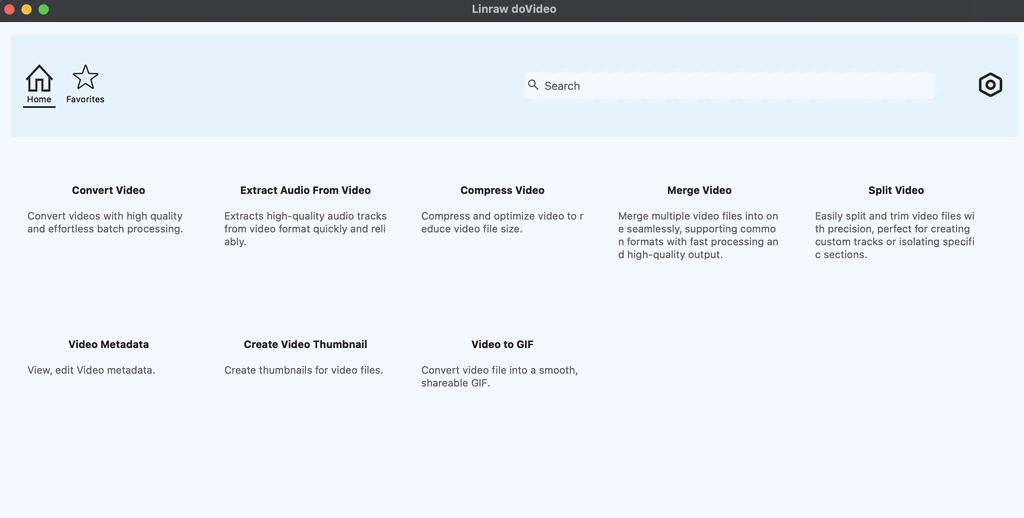
Key advantages:
Works on Windows and macOS
Includes multiple tiny tools in one app
Supports:
Video compression
Format conversion
File splitting and merging
Continuously updated with new tools
Why it matters:
Instead of installing multiple apps, you can streamline your workflow and process stock videos efficiently in one place.
Free vs Paid Stock Video Websites
Free Platforms
Cost-effective
Limited variety
Sometimes overused clips
Paid Platforms
Exclusive content
Higher quality
More licensing flexibility
When to Upgrade
Professional productions
Brand differentiation
Unique visuals required
Legal Tips for Using Free Stock Footage
Always check the license
Verify commercial use permissions
Be cautious with identifiable people or properties
Provide attribution when required
FAQs About Free Stock Video Websites
Are free stock videos really free?
Yes, but licensing varies by platform.
Can I use them for commercial projects?
Many sites allow it, but always verify.
Do I need to give credit?
Some require attribution; others don’t.
What is the best free stock video site?
Pexels and Pixabay are top choices for most users.
Are free video downloads safe?
Yes, if downloaded from reputable websites.
Conclusion
Free stock video websites are powerful resources for creators in 2026. They provide access to high-quality footage without the high costs of production.
Key takeaways:
Choose platforms based on licensing and quality
Use comparison tables to find the best fit
Combine multiple clips for better storytelling
Process videos efficiently with tools like Linraw doVideo
By combining the right resources with the right tools, you can create professional, engaging video content at scale—without breaking your budget.
However, if your workflow involves multiple types—such as images, audio, video, PDFs, or eBooks—then Linraw doUltra is a more powerful all-in-one option.
Related Chapters
