15 Best Free Image Websites for High-Quality Photos 2026 Guide
1. Introduction — Why Free Image Resources Matter in 2026
In today's digital landscape, visual content is no longer optional. Whether you are building a modern web application, maintaining a high-traffic blog, or scaling an e-commerce store, high-quality images drive engagement. Studies show that content featuring relevant imagery receives up to 94% more views than text-heavy alternatives.
However, content budgets are finite. Relying entirely on premium stock agencies can easily drain hundreds of dollars per month. Fortunately, the ecosystem for high-quality free stock photos has matured beautifully. In 2026, you no longer have to settle for cheesy, staged office photos or pixelated graphics. The free platforms available today offer breathtaking, professional-grade photography that can elevate any digital project without costing a dime.
2. What to Look for in a Free Image Website
Not all stock libraries are built the same way. When evaluating where to source your next set of assets, pay close attention to these four critical pillars:
Image Quality & Resolution: A great site should offer raw, uncompressed files suitable for both tiny social media squares and large desktop hero backgrounds. Look for platforms that vet submissions for focus, lighting, and composition.
License Types Explained: This is where many creators trip up. You will generally encounter three categories:
CC0 (Creative Commons Zero): The holy grail. You can copy, modify, distribute, and perform the work, even for commercial purposes, all without asking permission or giving credit.
Custom Royalty-Free Licenses: Used by platforms like Unsplash and Pexels. They allow free commercial and non-commercial use but explicitly forbid compiling their photos to replicate a competing stock image service.
Attribution Required: You can use the file for free, but you must clearly credit the creator and link back to the source platform.
Search & Filter Functionality: A massive library is useless if you can't find what you need. The best sites offer advanced tag filtering, color palette sorting, orientation selection (portrait vs. landscape), and semantic search.
Download Limits & Registration Requirements: While some platforms offer completely frictionless "click-and-download" systems, others gate high-resolution assets behind mandatory account registrations or restrict daily downloads.
3. The 15 Best Free Image Websites
#1 Unsplash
Unsplash remains the gold standard for high-end, artistic, and lifestyle imagery. It boasts a community of millions of global photographers contributing cinematic landscapes, authentic street photography, and modern minimalist setups.
Pros: Incredible aesthetic depth; top-tier search engine; vibrant community collections.
Cons: Because it's immensely popular, you may spot their top images widely used across the web.
Best For: Bloggers, brand builders, and designers looking for a premium feel.
#2 Pexels
Pexels is a massive aggregator that curates its own unique photos alongside submissions from other open-source libraries. What truly sets Pexels apart is its seamless incorporation of free vertical and horizontal stock videos.
Pros: Includes free video clips; robust built-in color-filtering tools.
Cons: Occasional overlaps with other platforms.
Best For: Social media managers requiring both video components and photo assets.
#3 Pixabay
If you need variety outside of standard photography, Pixabay is your primary destination. It offers a massive catalog spanning millions of high-quality vector illustrations, transparent PNG graphics, sound effects, and videos.
Pros: Unmatched asset diversity; excellent filter systems by image type.
Cons: The main photography interface can sometimes feature older, slightly more "clichéd" stock styles compared to Unsplash.
Best For: Multi-media creators and graphic designers looking for vectors and clip art.
#4 StockSnap.io
StockSnap utilizes a pure CC0 license structure and adds hundreds of new high-resolution images weekly. It features an exceptionally smart user interface that allows users to sort results by view counts, favorites, and trending popularity metrics.
Pros: 100% worry-free CC0 license; highly functional popularity sorting.
Cons: Smaller overall library volume than the top three giants.
Best For: Fast-paced digital marketers tracking visual trends.
#5 Reshot
Reshot focuses entirely on unique, non-stocky visual assets. Managed by the team behind Envato, it stands out by providing thousands of free icons and vector illustrations alongside traditional photography without any attribution requirements.
Pros: High originality factor; incredible selection of specialized SVG icons.
Cons: Less traditional "scenic landscape" variety.
Best For: Product developers, app builders, and UI/UX designers.
#6 Burst (by Shopify)
Built specifically with entrepreneurship in mind, Burst provides professional collections tailored around retail niches like fashion, tech, fitness, and beauty.
Pros: Business-centric framing; offers pre-packaged photo bundles based on specific industry sectors.
Cons: Broad general categories are slightly limited.
Best For: E-commerce store owners and dropshippers.
#7 FreeImages
FreeImages is a legacy catalog that provides an expansive assortment of millions of diverse assets. It requires a free login to grab high-resolution files, but offers precise categorized browsing.
Pros: Deep collection covering obscure everyday objects.
Cons: Heavy presence of paid sponsor ads scattered through the search queries.
Best For: Local businesses and regional editorial writers.
#8 ISO Republic
ISO Republic delivers a highly curated stream of vibrant imagery and video assets under an unrestricted custom license. The platform emphasizes rich color depth and distinct textures.
Pros: Crisp contrast ratios; excellent raw textures (wood grain, concrete, marble walls).
Cons: Infrequent upload frequency compared to the market leaders.
Best For: Background design work and creative mood boards.
#9 Gratisography
Tired of predictable stock photography? Gratisography proudly labels itself as the world’s weirdest collection of free high-res images. Expect humorous situations, quirky expressions, and unique edits.
Pros: Fully unique; entirely original concepts that command attention.
Cons: Completely unsuited for formal corporate environments or neutral layouts.
Best For: Eye-catching advertising campaigns or bold social media posts.
#10 Life of Pix
Created by the Adobe-partnered Leeroy creative agency, Life of Pix highlights a "Photographer of the Week" model, ensuring that art direction and composition standards remain incredibly strict.
Pros: High artistic merit; breathtaking architectural and urban shots.
Cons: Slower navigational response times on the platform interface.
Best For: High-end web layouts, portfolios, and lookbooks.
#11 Picography
Picography has been providing clean, high-resolution stock photos for over a decade. It features a lightweight, minimal interface that allows users to jump instantly to rapid downloads.
Pros: Snappy, straightforward download clicks; zero registration hurdles.
Cons: Simplified filtering options.
Best For: Quick web prototyping or rapid placeholder needs.
#12 SplitShire
SplitShire features the gorgeous work of a single professional Italian photographer, Francesco Mugnai. Because the entire site stems from one unified creative eye, the catalog feels incredibly cohesive.
Pros: Uniform style consistency; spectacular cinematic color grading.
Cons: Considerably smaller footprint (around several thousand photos total).
Best For: Stylized storytelling and unified slide presentations.
#13 Styled Stock Society
While primarily a premium platform, Styled Stock Society offers a brilliant tier of free promotional bundles tailored specifically around feminine branding, workspaces, and lifestyle elements.
Pros: Perfect color coordination for chic, modern branding.
Cons: Requires email registration to unlock the free download drops.
Best For: Beauty, wellness, lifestyle, and female-focused brands.
#14 Wikimedia Commons
With tens of millions of media files available, Wikimedia Commons is the largest crowdsourced database of public domain and educational imagery on Earth.
Pros: Unrivaled historical depth, scientific diagrams, and archival photography.
Cons: Extremely complex attribution guidelines that vary wildly asset by asset.
Best For: Academic researchers, historical writers, and journalists.
#15 rawpixel
rawpixel features an incredibly diverse mix of design assets, vintage public-domain art prints, modern vector design boards, and commercial mockups.
Pros: Best source for authentic, high-res vintage botanical prints and historical design layouts.
Cons: Free tier accounts face a fixed limit of 5 downloads per day.
Best For: Craft creators, print-on-demand sellers, and mixed-media designers.
4. Side-by-Side Comparison Table
| Website | Primary Asset Type | Core License Model | Standout Strength |
|---|---|---|---|
| Unsplash | Premium Photography | Custom Free License | Modern lifestyle aesthetics |
| Pexels | Photos & Videos | Custom Free License | Integrated vertical video assets |
| Pixabay | Photos, Vectors, SVGs | Custom Free License | Incredible multi-asset variety |
| StockSnap.io | Pure Photography | Creative Commons CC0 | Robust performance sorting filters |
| Reshot | Icons & Vector Work | Custom Free License | Unique SVG icon packs |
| Burst | Business Photography | Custom Free License | E-commerce niche collections |
| FreeImages | Multi-category Media | Custom Free License | Broad, practical object catalog |
| ISO Republic | High-contrast Media | Custom Free License | Rich architectural texture files |
| Gratisography | Quirky Photography | Custom Free License | Humorous, unconventional content |
| Life of Pix | Artistic Media | Public Domain / Free | Agency-level art composition |
| Picography | Clean Photography | Creative Commons CC0 | Frictionless, registration-free downloads |
| SplitShire | Unified Media | Custom Free License | Consistent stylistic look and feel |
| Styled Stock | Feminine Lifestyle | Promotional Free Tier | Chic workspace and beauty branding |
| Wikimedia | Historical Records | Mixed (CC0 to CC-BY-SA) | Academic and scientific archives |
| rawpixel | Design & Vintage Art | Custom Free / Public Domain | Beautifully restored vintage design plates |
5. Best Free Image Sites by Use Case
Best for Bloggers & Content Creators
Top Picks: Unsplash, Pexels, StockSnap
Why: These platforms deliver rich, emotional storytelling images that act as ideal article headers, breaking up heavy walls of text seamlessly.
Best for Web & UI Designers
Top Picks: Reshot, rawpixel, Life of Pix
Why: You get immediate access to clean vector layers, crisp layout mockups, and high-contrast abstract textures perfect for modern user interface components.
Best for Social Media Marketing
Top Picks: Pexels, Gratisography, SplitShire
Why: Pexels provides native vertical videos directly formatted for TikTok or Instagram Reels, while Gratisography gives you scroll-stopping quirky imagery that boosts engagement metrics.
Best for E-commerce & Business
Top Picks: Burst, Styled Stock Society
Why: These files are pre-categorized around real product industries, enabling entrepreneurs to build clean storefront lookbooks with minimal hassle.
Best for Editorial & Journalism
Top Picks: Wikimedia Commons, Pixabay, FreeImages
Why: When reporting on specific historical contexts, public events, or scientific breakthroughs, these deep historical catalogs offer accurate factual imagery.
6. How to Use Free Images Without Legal Risk
Using free stock sites feels simple, but making a single legal misstep can result in an expensive copyright infringement notice. Protect your business or project by mastering these foundational concepts:
The Golden Rule: "Free to download" does not mean "free to use however you want."
Understanding Creative Commons Licenses
Always look explicitly for CC0 or a custom site license that states "Free for Commercial Use." If a license lists an "NC" restriction (Non-Commercial), you absolutely cannot use that photo on a site that runs ads, sells products, or promotes a business services platform.
When You Need to Give Attribution
If an asset is marked with a CC-BY designation, you must provide clear text attribution. A standard format looks like this:
"Photo by [Artist Name] on [Platform Link]"
Place this notice clearly either directly beneath the image container or compiled elegantly at the footer of your webpage.
Images to Avoid Even If They're "Free"
Visible Trademark Logos: If an image features a prominent Apple logo, a Nike swoosh, or luxury automotive branding, avoid using it in an official commercial advertisement. The photographer may have given up their rights, but the brand itself has not consented to your endorsement.
Recognizable Private Property: Photos shot inside famous modern buildings or theme parks often require specific property releases for high-scale commercial advertisements.
Identifiable People: Be cautious using photos of individuals for sensitive promotional campaigns (e.g., healthcare products, political ads) without verified model releases.
7. What to Do After Downloading Your Free Images
Finding your ideal image is only half the battle. If you take a raw file fresh off Unsplash or Pexels and upload it directly to your website, you are asking for major performance issues.
Why Raw Downloaded Images Often Need Processing
High-quality free image platforms specialize in large, uncompressed resolution files—often measuring over 5000 pixels wide with file sizes stretching up to 15 Megabytes (MB).
Web Slowdowns: Images that large will cause your page speeds to plummet, hurting your core web vitals.
SEO Penalties: Google directly penalizes slow-loading websites, pushing them down the search engine results pages.
Format Mismatch: Raw files often arrive as heavy JPEGs or PNGs, whereas modern web standards prioritize lighter, modern compression alternatives.
Introducing Linraw doImage: Your All-in-One Image Tool
To solve these post-download issues efficiently, integrate a professional processing tool like Linraw doImage into your workflow. It acts as an all-in-one desktop utility designed to convert, compress, and refine raw stock assets before publishing.
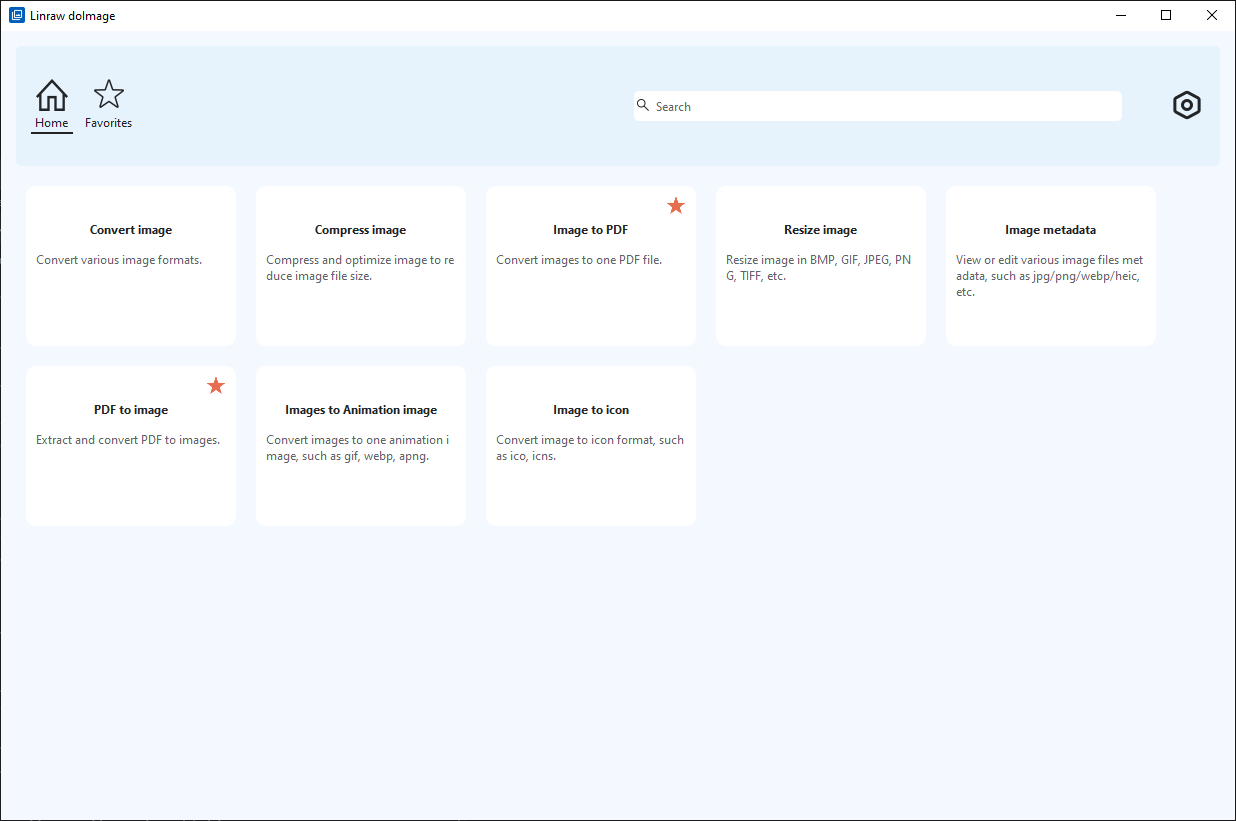
Convert Images to Any Format: Effortlessly transform older, cumbersome formats into lightweight, modern web standards like WebP or JPEG, which slash asset weight dramatically while retaining pixel clarity.
Compress Images Without Losing Quality: Through intelligent, lossy optimization algorithms, Linraw doImage shrinks file sizes by up to 80% with zero visible degradation to the naked eye.
Convert Images to PDF in Seconds: Cleanly compile multiple downloaded stock layouts or mockups into a single, highly presentable PDF document for client reviews.
Create GIFs from Multiple Images: Cycle a series of static downloads sequentially to produce simple animated loops perfect for interactive social media posts or email newsletters.
Batch Processing for Multiple Files: Don’t waste time processing downloads one by one. Drop an entire folder of 50 stock images into Linraw doImage to convert, resize, and rename them all simultaneously.
8. Complete Image Workflow: From Download to Publishing
To maximize your efficiency and preserve your site’s SEO ranking, implement this simple three-step deployment sequence for every asset you handle:
Find Your Asset: Sourcing Phase.
Identify the specific visual aesthetic your content requires. Use advanced semantic search parameters across platforms like Unsplash or Pexels to download the raw, highest-resolution file version available.Process & Optimize via Linraw doImage: Optimization Phase.
Import your downloaded assets into Linraw doImage. Run a batch sequence to resize the width to web-safe dimensions (typically 1200px to 1920px), compress the quality profile down to roughly 80%, and convert the output container directly to a WebP extension.Publish & Deploy Safely: Live Deployment.
Upload your streamlined asset to your web server or CMS. Populate descriptive Alt Text strings utilizing target keywords to ensure proper accessibility and maximum image-search discovery.
9. Tips to Find the Right Image Faster
Don't waste hours aimlessly scrolling. Implement these smart discovery tactics to locate your ideal visual materials in under two minutes:
Using Advanced Search Filters: Instead of typing broad phrases like "business," use structural keywords like
"minimalist creative workspace landscape orientation"or utilize built-in color filters to match your pre-existing brand palette seamlessly.Reverse Image Search Tricks: Found an expensive, premium stock photo that matches your layout perfectly? Drop its thumbnail file into a reverse search engine like Google Images or TinEye to uncover visually identical alternatives hosted on free CC0 platforms.
Organizing Your Personal Library: Avoid downloading the exact same files repeatedly. Maintain a simple local folder system split cleanly by structural themes (e.g.,
/Stock-Backgrounds,/Stock-People,/Stock-Textures).
10. Free vs. Paid Stock Photos — Is It Worth Upgrading?
While the top fifteen free sites are spectacular, there are distinct scenarios where investing in premium networks (like Shutterstock, iStock, or Adobe Stock) becomes necessary:
| Attribute | Free Stock Sites | Paid Stock Agencies |
|---|---|---|
| Exclusivity | Low — identical images are found on thousands of active sites. | High — premium pricing tiers reduce market saturation. |
| Legal Indemnity | Rarely provided — you use assets at your own risk. | Often included — up to $10,000+ protection against copyright claims. |
| Niche Specificity | Harder to discover hyper-specific or rare regional subject matters. | Vast libraries covering incredibly narrow concepts or technical steps. |
11. Frequently Asked Questions (FAQ)
Are free stock photos truly free for commercial use?
Yes, platforms utilizing CC0 or custom free licenses permit commercial use. This includes putting them on monetization-enabled blogs, commercial landing pages, or digital product advertisements. However, you cannot directly resell the raw images themselves on competing stock platforms.
Can I edit or modify free stock images?
Absolutely. You are encouraged to crop them, apply unique color filters, overlay text branding elements, or blend them into complex digital composite artwork layouts.
What's the difference between royalty-free and copyright-free?
"Royalty-free" means you do not have to pay an ongoing fee (a royalty) per use after acquiring the initial license. "Copyright-free" (or Public Domain) means the intellectual property protection has expired or been explicitly waived entirely, meaning nobody owns the rights exclusively.
Do I need to credit the photographer?
For CC0 and standard Unsplash/Pexels licenses, attribution is not legally mandatory, though it is highly appreciated by the community. For CC-BY licenses, attribution is strictly required.
What's the best tool to compress or convert free images?
The all-in-one tool Linraw doImage is highly recommended. It handles batch conversion, web optimization, and modern format processing (like WebP) smoothly within a single, unified interface.
12. Final Verdict — Which Free Image Site Is Best for You?
If you need a premium lifestyle, cinematic feel, make Unsplash your primary bookmark.
If your project relies heavily on modern vertical social video clips, prioritize Pexels.
If you are an illustrator or designer hunting for vector files and crisp SVGs, stick with Pixabay.
13. Conclusion
Sourcing world-class visuals no longer requires a premium corporate budget. By leveraging the fifteen platforms detailed in this guide, you can access millions of stunning, professional assets for free. Just remember to verify the license parameters of your chosen file, optimize your high-res downloads with a dedicated utility like Linraw doImage to safeguard your site's speed, and deploy your content with absolute confidence.
However, if your workflow involves multiple types—such as images, audio, video, PDFs, or eBooks—then Linraw doUltra is a more powerful all-in-one option.
Related Chapters
