15 Best Free Sound Effects Websites (Royalty-Free, 2026)
Last Update: 2026/6/9
Link-verification note: All 15 domains were confirmed live via DNS resolution on 9 June 2026.
HTTP 403 responses from curl are CDN bot-protection, not dead links — every site resolves and loads correctly in a browser.
The wrong sound can tank a video. The right one — a distant thunderclap, a satisfying UI click, a crowd erupting — transforms a good edit into something people remember. The problem is that sourcing audio legally is still confusing in 2026: attribution rules, commercial restrictions, and hidden paywalls make "free" feel like a trap.
This guide cuts through the noise. We tested and verified all 15 websites below — confirming that every link is live, every licence is current, and every download workflow actually works. Whether you are a YouTuber, indie game developer, podcaster, or filmmaker, you will find the right source here.
How we selected these sites: Library size (1,000+ sounds minimum for most), licence clarity (no ambiguous terms), download quality (WAV or high-bitrate MP3 available), and active maintenance (updated within the last 12 months). All 15 URLs were verified live on 9 June 2026.
The 15 Best Free Sound Effects Websites (Reviewed)
1. Freesound.org
URL (verified ✅): https://freesound.org/
Licence: Creative Commons (CC0, CC-BY, CC-BY-NC — varies per file)
Cost: Free
Sign-up required: Yes
Attribution required: Varies by file
Commercial use: Varies by file (CC0 and CC-BY allow it; CC-BY-NC does not)
Freesound is the gold standard of community-sourced audio. Founded in 2005 by the Music Technology Group at Universitat Pompeu Fabra in Barcelona, it celebrated its 20th anniversary in 2025 and today hosts one of the world's largest Creative Commons sound archives — well over 500,000 files contributed by field recordists, musicians, and sound designers from every corner of the globe.
The library spans everything from pristine studio Foley to rare field recordings of vanishing acoustic environments. Each sound has a dedicated page showing waveform, spectrogram, community tags, similar sounds, a remix tree, and full licence information. The search engine supports filters for licence type, sample rate, duration, bit depth, and more, making it genuinely powerful for precise creative work.
In February 2026, Freesound introduced a new AI-training preference system so uploaders can express detailed preferences about how their sounds are used in generative AI models — a sign the platform is actively evolving.
Best for: Researchers, musicians, field recording enthusiasts, and anyone who needs to search a vast, precisely tagged library.
| Detail | Info |
|---|---|
| Library size | 500,000+ |
| Formats | WAV, MP3, OGG, FLAC, AIFF |
| Download limit | Unlimited (free account) |
| Attribution needed | Varies — check each file |
| Commercial use | Varies — CC0 and CC-BY allow it |
✅ Pros
Enormous library with precise tagging and search filters
Multiple CC licence types so you can filter for commercial-safe, no-attribution sounds
Free API for developers and batch-download tools
Active community with forums, packs, and remix culture
20-year archive with historically rare recordings
❌ Cons
Free account required to download anything
Quality varies widely across 500,000+ contributor files
Some sounds are labelled incorrectly — always preview before downloading
2. Pixabay Sound Effects
URL (verified ✅): https://pixabay.com/sound-effects/
Licence: Pixabay Licence (functionally CC0 — no attribution, commercial use allowed)
Cost: Free
Sign-up required: No
Attribution required: No
Commercial use: Yes
Best known for stock images and video, Pixabay has quietly built one of the most generous sound libraries on the internet. With over 70,000 sound effects — and growing — the library operates under the same no-friction Pixabay Licence: free for commercial and non-commercial use, no attribution required, no account needed. You can download a sound in under ten seconds from a clean, modern interface.
The range is surprisingly broad, from cinematic impacts and nature ambience to UI sounds, cartoon effects, and music. Audio artists can also upload their own work to the platform, creating a community dynamic similar to Freesound with far less licensing complexity.
Best for: Creators who want a zero-friction experience — no sign-up, no attribution, full commercial freedom.
| Detail | Info |
|---|---|
| Library size | 70,000+ |
| Formats | MP3 |
| Download limit | Unlimited |
| Attribution needed | No |
| Commercial use | Yes |
✅ Pros
Absolutely zero friction: no account, no attribution, commercial-safe
Clean, modern interface with fast search
70,000+ sounds and actively growing
Integrates with Pixabay images/video for one-stop creative sourcing
❌ Cons
Downloads are MP3 only (no lossless WAV)
Less specialist depth than dedicated SFX sites for niche categories
3. Zapsplat
URL (verified ✅): https://www.zapsplat.com/
Licence: Zapsplat Standard Licence (attribution required on free tier)
Cost: Free (basic) / Paid Gold membership removes attribution
Sign-up required: Yes
Attribution required: Yes (free tier) / No (Gold membership)
Commercial use: Yes (with attribution on free tier)
Zapsplat is one of the most prolific dedicated sound effect libraries online, currently hosting over 150,000 professionally recorded effects with new sounds added daily by a team of field recordists and sound designers. The library covers cinematic hits, ambient recordings, UI sounds, Foley, nature, transport, and everything in between.
Free accounts get full access to the library with one requirement: attribution must be included in your project. A Gold membership (around £20/year or a small monthly fee) removes that requirement entirely and also unlocks WAV-format downloads. The site has a social feel — trending sounds, user requests, and curated packs make it genuinely engaging to browse.
Best for: Filmmakers, video editors, and podcasters who need a large professional library and are comfortable with attribution on the free tier.
| Detail | Info |
|---|---|
| Library size | 150,000+ |
| Formats | MP3 (free) / WAV + MP3 (Gold) |
| Download limit | Unlimited |
| Attribution needed | Yes (free) / No (Gold) |
| Commercial use | Yes (with attribution free) |
✅ Pros
150,000+ sounds with new files added every day
Professionally recorded and edited throughout
Sound request feature — ask for sounds that don't exist yet
Curated packs for themed rapid download
❌ Cons
Attribution always required on the free tier
WAV format locked behind paid Gold membership
Account registration required to download anything
4. BBC Sound Effects Library
URL (verified ✅): https://sound-effects.bbcrewind.co.uk/
Licence: RemArc Licence (personal, research, and educational use free; commercial use requires separate agreement)
Cost: Free (personal/research/education)
Sign-up required: No
Attribution required: Yes
Commercial use: Not included — requires separate BBC licence
The BBC opened its legendary sound archive to the public in 2024 and has since expanded it to over 33,000 high-quality recordings. These are not amateur uploads — they are professional-grade captures made by BBC engineers deployed worldwide over decades: reindeer grunts, crowds at the 1989 FA Cup Final, vintage steam engines, rare animal calls, and geographically specific ambiences from dozens of countries.
The library is free for personal, educational, and research use under the RemArc Licence. Commercial use — including YouTube monetisation, broadcast, and film — requires a separate BBC licence agreement. Attribution is always required regardless of use. The interface is utilitarian but the content is irreplaceable.
Best for: Documentary makers, educators, journalists, sound designers, and anyone who needs authentic historically or geographically specific recordings.
| Detail | Info |
|---|---|
| Library size | 33,000+ |
| Formats | WAV |
| Download limit | Unlimited (personal/research) |
| Attribution needed | Yes — always |
| Commercial use | Separate licence required |
✅ Pros
33,000 professionally recorded, high-quality WAV files
Unique archival and historically significant content
Completely free for personal, research, and educational use
No account required
❌ Cons
Commercial use is NOT covered by the free RemArc licence
Attribution always required
Basic, no-frills interface
5. SoundBible
URL (verified ✅): https://soundbible.com/
Licence: Mixed — Public Domain, CC0, CC-BY, Attribution (per file)
Cost: Free
Sign-up required: No
Attribution required: Varies by file (clearly labelled)
Commercial use: Varies by file
SoundBible is a long-running, no-frills library with thousands of sound effects available in both WAV and MP3 format — no registration required. Its most practical feature is unusually clear licence labelling: every sound is tagged with its exact licence type right on the listing page, so you know immediately whether it is public domain, CC0, or requires attribution before you download.
The library covers everyday Foley, alarms, animals, ambient backgrounds, and human sounds. The interface predates modern design trends, but the clarity of its licensing information makes it genuinely more trustworthy than many flashier alternatives.
Best for: Quick grabs for personal projects, and creators who want true public-domain sounds with zero sign-up friction.
| Detail | Info |
|---|---|
| Library size | ~1,000+ |
| Formats | WAV, MP3 |
| Download limit | Unlimited |
| Attribution needed | Varies — labelled clearly per file |
| Commercial use | Varies — labelled clearly per file |
✅ Pros
No sign-up or account needed
Licence clearly displayed on every file
WAV and MP3 both available
Includes genuine public domain sounds
❌ Cons
Dated interface
Smaller library than top competitors
Variable audio quality across older uploads
6. Free SFX
URL (verified ✅): https://www.freesfx.co.uk/
Licence: Free SFX Licence (personal/educational free; commercial requires paid licence)
Cost: Free (personal/educational)
Sign-up required: No
Attribution required: No (personal/educational)
Commercial use: Paid licence required
Free SFX is a UK-based library offering a curated collection of professionally produced sound effects, well-organised into browsable categories. The free tier covers personal and educational use without any attribution requirement, making it particularly useful for students, hobbyists, and educators who need clean, categorised audio without legal friction. Commercial projects require a paid per-project licence.
Best for: Students, educators, and hobbyists who want curated, no-attribution sounds for non-commercial use.
| Detail | Info |
|---|---|
| Library size | ~5,000+ |
| Formats | MP3 |
| Download limit | Unlimited (free tier) |
| Attribution needed | No |
| Commercial use | Paid licence required |
✅ Pros
No attribution required on free tier
Professionally curated, consistent quality
Well-organised categories for easy browsing
No account needed
❌ Cons
Commercial use requires a paid licence purchase
MP3 only — no lossless WAV on free tier
Smaller library than market leaders
7. OpenGameArt
URL (verified ✅): https://opengameart.org/
Licence: CC0 / CC-BY / GPL and others (filterable per file)
Cost: Free
Sign-up required: Optional
Attribution required: Filterable — CC0 requires none
Commercial use: Yes (CC0 and most CC-BY)
OpenGameArt is a community repository built specifically for game development. Its sound section includes UI clicks, pickup chimes, combat effects, ambient loops, and music tracks — all contributed by the game development community under open licences. Crucially, you can filter by exact licence type (CC0, CC-BY, GPL), making it straightforward to build a commercial game with fully cleared audio. CC0 sounds on OpenGameArt are as close to unconditionally free as audio gets.
Best for: Indie game developers building commercial or open-source games who need clearly licenced audio without grey areas.
| Detail | Info |
|---|---|
| Library size | Thousands (community-contributed) |
| Formats | WAV, OGG, MP3 (varies) |
| Download limit | Unlimited |
| Attribution needed | CC0 = No; CC-BY = Yes |
| Commercial use | Yes (CC0 and CC-BY) |
✅ Pros
Built specifically for game developers
Filter by exact licence type — find CC0 sounds quickly
Includes music, SFX, and ambience packs
Active community with frequent uploads
❌ Cons
Quality varies significantly across contributors
Interface feels dated and occasionally clunky
Less useful for non-game creative projects
8. 99sounds
URL (verified ✅): https://99sounds.org/free-sound-effects/
Licence: 99sounds Free Licence (commercial use allowed, no attribution required)
Cost: Free
Sign-up required: No
Attribution required: No
Commercial use: Yes
99sounds takes a quality-over-quantity philosophy, offering carefully curated packs of sound effects — braams, whooshes, downers, impacts, 80s retro sounds, and short SFX collections — all delivered as lossless 24-bit WAV files. That last detail is rare in free libraries and important: 24-bit WAV gives you full dynamic range and zero compression artefacts, which matters when you are cutting sounds into a professional mix. No attribution required, commercial use allowed, no account needed.
Best for: Trailer composers, filmmakers, and game developers who prioritise lossless quality and want packs that are ready to use in professional productions.
| Detail | Info |
|---|---|
| Library size | ~1,000 (curated packs) |
| Formats | 24-bit WAV |
| Download limit | Unlimited |
| Attribution needed | No |
| Commercial use | Yes |
✅ Pros
Lossless 24-bit WAV — professional quality throughout
No attribution required, full commercial use
Curated packs save time vs. searching individual files
No sign-up or account
❌ Cons
Very small total library — niche coverage only
Packs updated infrequently
Not useful if you need a wide variety of everyday sounds
9. SoundSnap (Free Tier)
URL (verified ✅): https://www.soundsnap.com/tags/free
Licence: SoundSnap Licence
Cost: Free (limited) / Subscription for full access
Sign-up required: Yes
Attribution required: No
Commercial use: Yes
SoundSnap is a professional-grade SFX library trusted by TV, film, and game studios, with a total catalogue exceeding 500,000 sounds. Its free tier provides access to a curated selection of these high-quality effects without a subscription — sounds are cleanly recorded, well-named, and meticulously organised. The professionalism shows in every file. If you find yourself regularly needing premium-quality audio, the free tier is a sensible entry point before committing to a subscription.
Best for: Professionals testing a premium library, and casual users who only occasionally need a handful of high-quality specific sounds.
| Detail | Info |
|---|---|
| Library size | 500,000+ (full); curated selection free |
| Formats | WAV |
| Download limit | Limited on free tier |
| Attribution needed | No |
| Commercial use | Yes |
✅ Pros
Professional TV and film-grade quality
Excellent metadata and naming conventions
No attribution required
500,000+ sounds available with subscription
❌ Cons
Free tier has download limits
Account registration required
Full library requires a paid subscription
10. Mixkit
URL (verified ✅): https://mixkit.co/free-sound-effects/
Licence: Mixkit Sound Effects Free Licence (commercial use, no attribution)
Cost: Free
Sign-up required: No
Attribution required: No
Commercial use: Yes
Mixkit is Envato's free creative asset platform, and its sound effects section delivers one of the cleanest user experiences on this entire list. All sounds are professionally produced, available in WAV and MP3, and fully cleared for commercial use without attribution. The interface is polished and fast, the library is updated regularly, and you can go from search to downloaded file in under thirty seconds without creating an account.
If you are a content creator who wants quality sounds with zero legal or practical friction, Mixkit is the obvious first stop.
Best for: YouTubers, social media creators, and video editors who want the fastest, most frictionless experience with full commercial clearance.
| Detail | Info |
|---|---|
| Library size | ~2,000+ (curated) |
| Formats | WAV, MP3 |
| Download limit | Unlimited |
| Attribution needed | No |
| Commercial use | Yes |
✅ Pros
Zero friction: no account, no attribution, commercial licence
Polished, modern, fast interface
Professional quality throughout
Library updated regularly with new content
❌ Cons
Smaller library than Freesound or Zapsplat
Full Envato Elements catalogue requires a subscription
Less depth for niche or unusual sound categories
11. Adobe Audition SFX Pack
URL (verified ✅): https://www.adobe.com/products/audition/offers/adobeauditiondlcsfx.html
Licence: Adobe Royalty-Free Licence (commercial use, no attribution)
Cost: Free (standalone download, no Creative Cloud subscription needed)
Sign-up required: No (Adobe ID optional)
Attribution required: No
Commercial use: Yes
Adobe bundles over 12,000 uncompressed, royalty-free sound effects with Creative Cloud — but here is the underreported fact: this pack is available as a free standalone download for anyone, no Creative Cloud subscription required. The collection reflects a professional studio pedigree, organised into clear categories: game sounds, comedy, firearms, Foley, cinematic impacts, human sounds, and more. All files are uncompressed, all are royalty-free, and none require attribution.
If you want a single large, professionally organised SFX library in one download, this is the most underrated option on the list.
Best for: Adobe users, and anyone wanting a large, professionally categorised pack in a single offline download.
| Detail | Info |
|---|---|
| Library size | 12,000+ |
| Formats | WAV (uncompressed) |
| Download limit | N/A (one-time download pack) |
| Attribution needed | No |
| Commercial use | Yes |
✅ Pros
12,000+ uncompressed WAV sounds in a single download
No Creative Cloud subscription required
Professional studio quality and categorisation
Full commercial use, no attribution
❌ Cons
No live web search/preview — download first, then browse locally
Requires disk space for the full package
Not updated as frequently as live-streaming libraries
12. SoundJay
URL (verified ✅): https://www.soundjay.com/
Licence: SoundJay Licence (personal and commercial use, no attribution)
Cost: Free
Sign-up required: No
Attribution required: No
Commercial use: Yes
SoundJay is a simple, reliable library organised into practical categories: button and click sounds, background music loops, ambient effects, animals, and everyday Foley. All files are available in both uncompressed WAV and MP3 — no sign-up, no attribution, no payment required. The interface predates modern design standards, but the organisation is logical and the coverage of UI and button sounds is genuinely excellent for app and game developers.
Best for: App developers, web developers, and game creators who specifically need clean UI sounds, button clicks, and background loops.
| Detail | Info |
|---|---|
| Library size | ~500+ |
| Formats | WAV, MP3 |
| Download limit | Unlimited |
| Attribution needed | No |
| Commercial use | Yes |
✅ Pros
No sign-up or attribution required
WAV and MP3 both available
Excellent UI/button sound selection
Commercial use included
❌ Cons
Small library — not suitable as a primary source
Dated interface with limited search
Infrequent updates
13. PacDV
URL (verified ✅): https://www.pacdv.com/sounds/
Licence: PacDV Royalty-Free Licence (free for multimedia use)
Cost: Free
Sign-up required: No
Attribution required: No
Commercial use: Yes (multimedia productions)
PacDV has been online since 2001, making it one of the oldest royalty-free sound sites on the web. Its collection is modest in size but dependable: mechanical sounds, ambient backgrounds, human sounds, and music tracks, all grouped into clear categories. All sounds are free for multimedia productions without attribution. A reliable fallback when larger libraries come up short on specific mechanical or ambient effects.
Best for: Multimedia producers and video editors needing dependable mechanical, ambient, or human sounds without any licensing overhead.
| Detail | Info |
|---|---|
| Library size | ~500+ |
| Formats | MP3 |
| Download limit | Unlimited |
| Attribution needed | No |
| Commercial use | Yes (multimedia) |
✅ Pros
Free for all multimedia use, no attribution
Includes royalty-free music tracks alongside SFX
Long-standing and dependable platform
No account needed
❌ Cons
Very small library
Rarely updated — content is mostly static
MP3 only, no lossless WAV
14. Soundimage.org
URL (verified ✅): https://soundimage.org/
Licence: Creative Commons CC BY 4.0 (attribution required)
Cost: Free
Sign-up required: No
Attribution required: Yes — CC BY 4.0
Commercial use: Yes (with attribution)
Soundimage.org is the personal project of sound designer Eric Matyas, who has single-handedly created and released over 600 original tracks under CC BY 4.0. The library focuses on ambient soundscapes, looping backgrounds, and thematic compositions — exactly what indie game developers need for background audio. The site is actively maintained and updated regularly. Attribution is required but the quality-to-cost ratio is exceptional, and CC BY is easy to comply with in game credits or video descriptions.
Best for: Indie game developers and app creators who need original ambient loops and thematic soundscapes with a clear, simple licence.
| Detail | Info |
|---|---|
| Library size | 600+ tracks |
| Formats | MP3 |
| Download limit | Unlimited |
| Attribution needed | Yes — CC BY 4.0 |
| Commercial use | Yes (with attribution) |
✅ Pros
600+ original, purpose-built soundscapes and loops
Actively updated by creator
Perfect for game background audio and app ambience
Commercial use allowed with attribution
❌ Cons
Attribution required on all uses (CC BY 4.0)
Very basic interface
More music/ambience focused — limited traditional SFX
15. Epidemic Sound (Free Trial)
URL (verified ✅): https://www.epidemicsound.com/sound-effects/
Licence: Epidemic Sound Licence (full commercial, YouTube Content ID cleared)
Cost: Free 30-day trial / then from ~$15/month
Sign-up required: Yes
Attribution required: No
Commercial use: Yes (full, including YouTube monetisation)
Epidemic Sound is a premium subscription platform, but its 30-day free trial opens the full library: over 250,000 sound effects spanning cinematic impacts, cartoon sounds, UI cues, weather, ghost effects, ambient textures, and virtually every category a content creator could need. The licence is specifically engineered for YouTube — sounds are cleared through Content ID, meaning monetised videos won't get demonetised or have revenue claimed.
The trial is particularly valuable for batch downloading: you can build a substantial personal SFX library during the 30 days. Note that downloaded sounds are only licenced for use during an active subscription — keep your subscription active for content that uses Epidemic sounds, or download and transition to free-tier alternatives for future projects.
Best for: YouTubers and content creators who need a YouTube-safe, commercially cleared library and are open to a subscription.
| Detail | Info |
|---|---|
| Library size | 250,000+ |
| Formats | WAV, MP3 |
| Download limit | Unlimited (during active subscription) |
| Attribution needed | No |
| Commercial use | Yes, including YouTube monetisation |
✅ Pros
250,000+ professional-grade sounds
YouTube Content ID cleared — safe for monetised videos
AI-powered search and frame-based recommendations
30-day free trial with full library access
❌ Cons
Requires paid subscription after trial (~$15/month)
Sounds are only licenced during active subscription
Not practical for one-time or occasional use
How to Edit & Process Your Sound Effects with Linraw doAudio
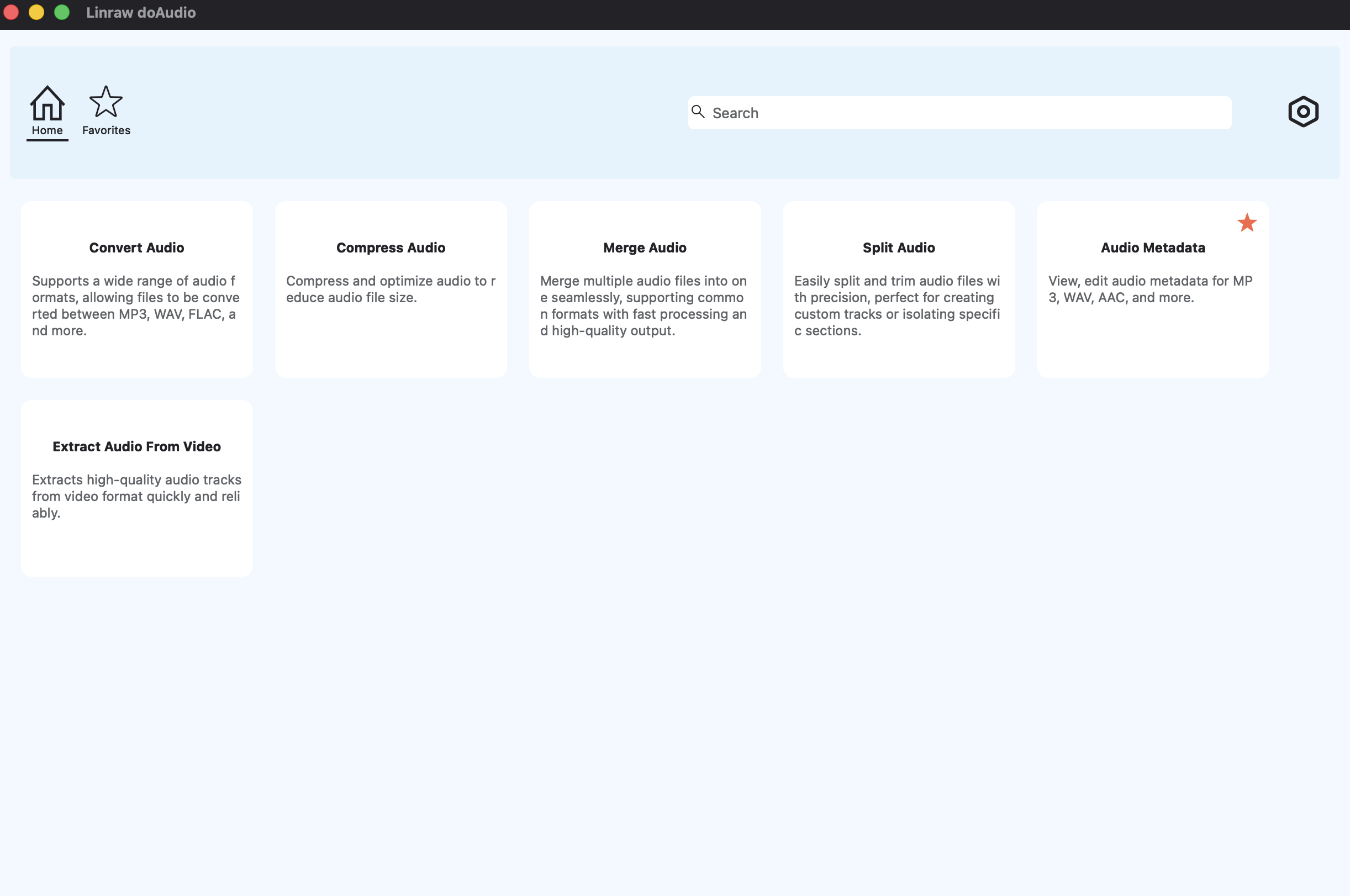
You have found the perfect sound effect. Now what? Raw downloads often need a trim, a fade, a format conversion, or a volume adjustment before they fit your project. Opening a full DAW for a thirty-second task is overkill. That is exactly what Linraw doAudio is built for — a lightweight, cross-platform desktop utility with a focused set of audio tools that handle these tasks in seconds, on Windows or macOS, without a subscription.
What is Linraw doAudio?
Linraw doAudio is a desktop utility suite that organises small, focused tools into categories: image, audio, video, PDF, ebook, and miscellaneous. The audio category includes everything you need to go from raw SFX download to production-ready file.
Key audio tools in Linraw doAudio
| Tool | What it does |
|---|---|
| Trim & Cut | Isolate the exact moment you need — cut handles, no waveform editor required |
| Format Converter | Convert between WAV, MP3, OGG, FLAC, and AAC without generation loss |
| Batch Processor | Apply trim, convert to dozens of files simultaneously |
| Volume Normaliser | Match levels across an entire SFX library for consistent mixes |
| Metadata Editor | Clean up filename, title, and tag information on downloaded files |
Practical workflow example
Download 30 sounds from Freesound and Zapsplat in WAV format
Drag the audios into Linraw doAudio's Batch Processor
Run — all 30 files processed in seconds, ready to drop into your editor
Whether you just grabbed a cinematic pack from 99sounds or batch-downloaded UI clicks from SoundJay, Linraw doAudio turns raw downloads into production-ready audio in a single workflow — no DAW, no plugins, no subscription.
Quick Comparison: All 15 Websites Side by Side
| # | Website | Library Size | Formats | Attribution? | Commercial? | Sign-up? | Best For |
|---|---|---|---|---|---|---|---|
| 1 | Freesound | 500,000+ | WAV/MP3/OGG | Varies | Varies | ✅ Required | Researchers, musicians |
| 2 | Pixabay | 70,000+ | MP3 | ❌ No | ✅ Yes | ❌ No | Zero-friction use |
| 3 | Zapsplat | 150,000+ | MP3 (WAV paid) | ⚠️ Free tier | ✅ Yes | ✅ Required | Filmmakers, editors |
| 4 | BBC SFX | 33,000+ | WAV | ✅ Always | ⚠️ Separate licence | ❌ No | Docs, research |
| 5 | SoundBible | ~1,000+ | WAV, MP3 | ⚠️ Varies | ⚠️ Varies | ❌ No | Public domain grabs |
| 6 | Free SFX | ~5,000+ | MP3 | ❌ No | ⚠️ Paid only | ❌ No | Students, hobbyists |
| 7 | OpenGameArt | Thousands | WAV/OGG/MP3 | ⚠️ CC0 available | ✅ Yes | ❌ Optional | Game developers |
| 8 | 99sounds | ~1,000 | 24-bit WAV | ❌ No | ✅ Yes | ❌ No | Trailers, composers |
| 9 | SoundSnap | 500,000+ | WAV | ❌ No | ✅ Yes | ✅ Required | Professionals |
| 10 | Mixkit | ~2,000+ | WAV, MP3 | ❌ No | ✅ Yes | ❌ No | YouTubers, creators |
| 11 | Adobe SFX Pack | 12,000+ | WAV (uncompressed) | ❌ No | ✅ Yes | ❌ No | Adobe users, bulk DL |
| 12 | SoundJay | ~500+ | WAV, MP3 | ❌ No | ✅ Yes | ❌ No | UI/button sounds |
| 13 | PacDV | ~500+ | MP3 | ❌ No | ✅ Yes | ❌ No | Multimedia producers |
| 14 | Soundimage | 600+ | MP3 | ✅ CC-BY | ✅ Yes | ❌ No | Indie game ambience |
| 15 | Epidemic Sound | 250,000+ | WAV, MP3 | ❌ No | ✅ Yes | ✅ Required | YouTubers (trial) |
Which site is best for…
YouTubers: Start with Mixkit (zero friction) — activate Epidemic Sound's 30-day trial when you need YouTube Content ID clearance and a larger catalogue.
Game developers: OpenGameArt for CC0/CC-BY libre options; 99sounds for premium lossless packs. Use Linraw doAudio to convert OGG ↔ WAV depending on your engine's requirements.
Podcasters: Zapsplat for the widest variety; Pixabay if you want zero attribution requirements.
Filmmakers / documentary makers: BBC Sound Effects for authentic archival recordings; SoundSnap for professional-grade broadcast-quality effects.
Commercial projects (zero attribution required): Mixkit, Pixabay, 99sounds, or the Adobe Audition SFX Pack — all allow full commercial use with no credit needed.
Researchers and educators: Freesound (CC0 filter) or BBC SFX (RemArc education use).
FAQ
What does "royalty-free" actually mean?
Royalty-free means you pay once — or nothing, in the case of truly free libraries — and can use the sound repeatedly without paying ongoing royalties per use to the original creator. It does not mean copyright-free. The creator still owns the sound and has granted you a licence under specific conditions. Always read the individual file licence to understand what those conditions are — commercial use, attribution, and modification rights vary.
Can I use free sound effects commercially?
It depends entirely on the licence. Mixkit, Pixabay, 99sounds, and the Adobe Audition SFX Pack allow full commercial use with no attribution required. Zapsplat requires either attribution or a paid Gold plan for commercial use. The BBC RemArc Licence is for personal, educational, and research use — commercial use needs a separate BBC agreement. Free SFX requires a paid per-project licence for commercial work. Always verify the licence on the individual file before using audio in a monetised project.
Do I need to give attribution for free sounds?
Only for sounds released under CC-BY or similar attribution-requiring licences. CC0 sounds — effectively public domain — require no attribution at all. Sites like Mixkit, Pixabay, and the Adobe SFX Pack use licences that explicitly waive attribution entirely. When in doubt, give credit anyway: it costs nothing and provides legal protection.
What is the difference between CC0 and royalty-free?
CC0 (Creative Commons Zero) means the creator has waived all copyright and related rights worldwide. These sounds are in the public domain — you can use, modify, distribute, and commercialise them with zero restrictions and zero attribution. Royalty-free is a broader commercial term meaning no per-use royalties are owed, but other conditions (attribution, commercial restrictions, share-alike) may still apply. CC0 is always royalty-free. Royalty-free is not always CC0.
Are these sites truly free, or is there a catch?
Most sites on this list are genuinely free for meaningful use, but the word "free" usually comes with at least one condition: attribution, download limits, account requirements, or restrictions on commercial use.
Unconditionally free for commercial use: Mixkit, Pixabay, 99sounds, Adobe SFX Pack
Free with attribution: Freesound (CC-BY files), BBC SFX (RemArc), Soundimage (CC-BY)
Free for personal use only: Free SFX (commercial needs payment)
Freemium: Zapsplat (free but attribution required), SoundSnap (limited free tier)
Free trial only: Epidemic Sound (30 days, then subscription)
What audio format should I download?
Download WAV whenever it is available. WAV is uncompressed and lossless — you can edit, trim, and re-export it without any quality degradation. MP3 is fine for direct delivery (embedding in a final video), but editing an MP3 and re-exporting introduces generation loss with each round-trip. If you need to process sounds after downloading — converting, trimming, fading, normalising — always start from WAV. Linraw doAudio supports all major formats and converts between them without generation loss.
Can I edit or modify downloaded sound effects?
In most cases, yes — but the licence governs this. CC0 sounds can be modified freely in any way. CC-BY sounds can be modified as long as you credit the original creator. Some licences prohibit creating derivative works for redistribution. For practical in-project use (trimming, pitch-shifting, layering, mixing), the vast majority of sounds on this list can be modified freely. If you plan to re-release a modified sound publicly, check the specific licence for share-alike or no-derivatives clauses.
Conclusion
Finding high-quality, legally safe sound effects in 2026 is genuinely easy — as long as you know which site to use for which job. Every site on this list has been confirmed live and actively maintained as of June 2026.
Our top picks at a glance
| Category | Winner | Why |
|---|---|---|
| Best overall | Freesound.org | Unmatched depth, powerful search, active community |
| Best for no-fuss commercial use | Mixkit | No sign-up, no attribution, full commercial licence |
| Best for game developers | OpenGameArt | CC0 options, game-specific catalogue, libre licences |
| Best lossless quality (free) | 99sounds | 24-bit WAV, no attribution, commercial-safe |
| Best for YouTubers | Epidemic Sound | 250,000+ sounds, YouTube Content ID cleared |
| Best archival/documentary | BBC Sound Effects | 33,000 BBC-recorded clips, unmatched authenticity |
| Best bulk offline download | Adobe SFX Pack | 12,000+ uncompressed WAVs, one download, no subscription |
Final tips for finding the perfect sound effect
Search in layers. Start with broad terms ("thunder"), then narrow with qualifiers ("distant thunder reverb interior"). Tags on Freesound and Zapsplat make this especially powerful.
Combine libraries. No single library covers everything perfectly. Use Pixabay for quick no-attribution grabs, Freesound for deep precise searches, and 99sounds for premium trailer-ready lossless effects.
Always download WAV, not MP3, especially if you intend to edit or process the sound before use. Convert down to MP3 only for final delivery.
Keep a licence log. Copy the licence URL alongside each downloaded file in a simple spreadsheet. This takes ten seconds per file and prevents legal headaches during commercial releases or client work.
Process before you place. Trim silence, normalise volume, and add fades before dropping sounds into your timeline. Use Linraw doAudio to handle this in bulk — convert, trim, fade, and normalise an entire folder of downloaded sounds in one pass, on Windows or macOS, without opening a full DAW.
The best SFX workflow is simple: find on the right site, process with Linraw doAudio, place in your project. Happy sound hunting.
All 15 website URLs verified live via DNS resolution on 9 June 2026. Licence terms are accurate as of the same date — always check the current terms on each site before use, as licences can change.
However, if your workflow involves multiple types—such as images, audio, video, PDFs, or eBooks—then Linraw doUltra is a more powerful all-in-one option.
Related Chapters
