15 Best Free Icon Websites (High-Quality & Royalty-Free, 2026)
Last Update: 2026/6/16
Finding truly free, high-quality icons without licensing traps is harder than it sounds. Some sites hide attribution requirements in fine print. Others push you toward a paywall after three downloads. A few classics have quietly shut down.
This guide cuts through the noise. Below are the 15 best free icon websites available right now — all verified active in 2026 — with honest notes on library size, available formats, license terms, and the exact type of project each one suits best.
What Makes a Great Free Icon Website?
Not every "free" icon site is created equal. Before diving into the list, here are the four criteria used to evaluate each one:
Clear, permissive licensing. The best sites offer MIT, CC0, or attribution-only licenses — not mystery "free for personal use" language that bans commercial work.
Format variety. SVG should be available as standard. PNG exports, Figma plugins, and npm packages are strong bonuses.
Design quality and consistency. A library where every icon looks like it was drawn by a different person at different scales is hard to use professionally.
Actively maintained. Libraries abandoned years ago accumulate outdated icons and broken download links. Every site on this list was confirmed active in 2026.
⚠️ Heads-up: Iconfinder — once a popular destination — permanently shut down on November 15, 2025, after being acquired by Freepik. Its assets migrated to Flaticon. If you bookmarked Iconfinder, it now redirects to Freepik's icon catalog.
The 15 Best Free Icon Websites in 2026
1. Flaticon — Largest Free Icon Library Online
Library: 16M+ icons | Formats: SVG, PNG, EPS, PSD | License: Flaticon License | Attribution: Required (free plan)
Flaticon is the biggest icon marketplace on the internet, owned by Freepik. The sheer scale is staggering — millions of icons spanning flat, outline, filled, 3D, and animated styles, with new packs added daily. The free plan covers an enormous range and only asks for a visible credit link back to Flaticon. A Flaticon Premium subscription removes that requirement and unlocks higher-resolution exports.
The in-browser editor lets you change icon colors and download in your chosen format without installing anything. Flaticon also integrates directly with Google Workspace, Figma, and Adobe products.
Best for: Marketers, content creators, and anyone who needs to find an icon for almost any concept imaginable — quickly.
2. Icons8 — Unified Style System Across 1.3 Million Icons
Library: 1.3M+ icons | Formats: SVG, PNG, PDF, Lottie | License: Icons8 License | Attribution: Required (free plan)
Icons8 stands out for its commitment to visual consistency. Its icons are grouped by style — iOS, Material, Windows, Fluent, Doodle, Flat Color, and more — so you can pick a style and maintain it across an entire project without mixing aesthetics. The free plan offers PNG exports up to 100px with attribution; paid plans unlock SVG exports, higher resolution, and no credit requirement.
Beyond icons, Icons8 also provides illustrations, photos, and a useful background-removal tool, making it a versatile one-stop resource for design assets.
Best for: UI designers who need a coherent, consistent icon style system across a full product or presentation.
3. The Noun Project — Community-Driven Icon Language
Library: 5M+ icons | Formats: SVG, PNG | License: CC BY | Attribution: Yes
The Noun Project is built around a single idea: every noun in every language can be represented by a symbol. The result is one of the most culturally diverse icon collections available, with contributors from around the world. Each icon comes with a CC BY license on the free plan, meaning you must credit the designer. A NounPro subscription removes attribution requirements.
Best for: Educators, nonprofit organizations, accessibility-focused projects, and anyone who needs globally recognizable symbols.
4. Heroicons — Beautiful SVG Icons by the Tailwind CSS Team
Library: 300+ icons | Formats: SVG, JSX, React | License: MIT | Attribution: Not required
Heroicons was designed by Steve Schoger and is maintained by the Tailwind CSS team. Every icon is hand-crafted at a 24×24 grid, available in both outline (1.5px stroke) and solid (filled) variants. At over 17 million monthly npm downloads, it is one of the most widely used icon libraries in modern web development.
The MIT license means zero attribution required — just drop the SVG or JSX into your project and ship. It integrates perfectly with shadcn/ui, Radix, and any Tailwind-based stack.
Best for: React, Next.js, and Tailwind CSS developers building clean, professional web interfaces.
5. Feather Icons — Minimalist Open-Source SVG Set
Library: 286 icons | Formats: SVG, PNG, npm | License: MIT | Attribution: Not required
Feather is the gold standard for minimalist icon design. Every icon shares an identical 24×24 grid, a uniform 2px stroke weight, and rounded line caps — producing a cohesive look that works equally well at small sizes and large. The collection is intentionally small, covering the essentials: navigation, editing, weather, file management, and social.
Best for: Developer tools, dashboards, and any interface that values visual clarity over icon variety.
6. Phosphor Icons — Flexible Multi-Weight Icon Family
Library: 7,000+ icons | Formats: SVG, PNG, Figma, React, Vue | License: MIT | Attribution: Not required
Phosphor offers every icon in six weights — Thin, Light, Regular, Bold, Fill, and Duotone — letting designers introduce visual hierarchy without switching libraries. The icons are designed at 16×16px to remain legible at small sizes while scaling cleanly to any dimension. With packages for React, Vue, Flutter, and Elm, Phosphor suits complex applications that need icons across many contexts.
Best for: Design systems and multi-platform products that need icons with visual hierarchy and weight variation.
7. Tabler Icons — 5,000+ Consistent Stroke Icons (MIT)
Library: 5,000+ icons | Formats: SVG, PNG, Webfont, npm | License: MIT | Attribution: Not required
Tabler Icons is a developer-first library built for web apps, dashboards, and admin panels. Every icon is a clean, consistent stroke vector on a 24×24 grid. The library is fully customizable: you control stroke width, color, and size directly in CSS or via npm props. At over 5,000 icons and MIT-licensed, Tabler is one of the most comprehensive free stroke-icon sets available.
Best for: Developers building dashboards, admin interfaces, and data-heavy web applications.
8. Bootstrap Icons — Official Free SVG Library from Bootstrap
Library: 2,000+ icons | Formats: SVG, Webfont, npm | License: MIT | Attribution: Not required
Bootstrap Icons is the official icon library maintained by the Bootstrap team, covering over 2,000 icons in a clean, consistent outline style. It ships as an SVG sprite, individual SVGs, and a webfont. While it pairs naturally with Bootstrap's component library, it has zero hard dependency on Bootstrap itself — it works in any HTML, React, Vue, or Angular project.
Best for: Bootstrap users and any developer who wants a polished, no-frills SVG icon set with excellent format options.
9. Material Symbols (Google) — Google's Official Icon Library
Library: 3,000+ icons | Formats: SVG, Variable Font | License: Apache 2.0 | Attribution: Not required
Material Symbols uses a variable font approach: a single font file lets you adjust weight, fill, grade, and optical size dynamically using CSS — no extra downloads required per variant. The library covers over 3,000 icons spanning UI controls, navigation, hardware, and communication. Google adds new symbols regularly, and the library is a core part of Material Design 3.
Best for: Android developers, Google Workspace integrations, and any product built on Material Design.
10. Ionicons — Clean Icons for Web, iOS & Android
Library: 1,300+ icons | Formats: SVG, Webfont, npm | License: MIT | Attribution: Not required
Ionicons is the icon library built by the Ionic Framework team. Each icon is offered in three styles — Outline, Filled, and Sharp — covering the major visual variants you need for interactive states. The MIT-licensed library integrates natively with Ionic components but works standalone in any HTML or JavaScript project.
Best for: Mobile-first apps, hybrid apps built with Ionic Framework, and web projects that need cross-platform icon conventions.
11. Remix Icon — Neutral-Style Open-Source System
Library: 3,200+ icons | Formats: SVG, PNG, Webfont | License: Apache 2.0 | Attribution: Not required
Remix Icon is an open-source neutral-style icon system with all icons drawn on a precise 24×24 grid, available in Outline and Filled variants. What sets Remix apart is its unusually strong coverage of AI-related icons — making it a natural fit for products in the AI space — alongside social-media, media-control, and business icons. All 3,200+ icons are free for personal and commercial use.
Best for: AI product UIs, SaaS dashboards, and projects where you want a modern, neutral icon aesthetic with good commercial-use terms.
12. Lucide Icons — Community-Maintained Feather Fork
Library: 1,500+ icons | Formats: SVG, React, Vue, Svelte, npm | License: ISC | Attribution: Not required
Lucide began as a community fork of Feather Icons and has since grown into its own thriving ecosystem. While Feather's original set has been largely frozen, Lucide receives regular updates: new icons, bug fixes, and improved stroke consistency. The library ships with first-class packages for React, Vue, Svelte, Angular, and Preact — all fully tree-shakeable.
Best for: Developers who want Feather's aesthetic with ongoing updates, a wider icon set, and modern framework integrations.
13. SVG Repo — 500,000+ Open-Licensed SVG Icons
Library: 500,000+ SVGs | Formats: SVG, PNG, EPS, PDF | License: CC0 / MIT (varies) | Attribution: Usually not required
SVG Repo is an aggregator — a single search interface across hundreds of collections. If you need an icon for something niche, SVG Repo is where you look when every other library comes up empty. The built-in editor lets you customize color, stroke width, and size before downloading without any sign-up. Always check the license badge on individual icons before using commercially.
Best for: Finding obscure icons, quick one-off downloads, and situations where no single-style library has what you need.
14. Streamline Icons — Designer-First Icon System
Library: 100,000+ icons (free tier available) | Formats: SVG, PNG, Figma, Sketch | License: Streamline License | Attribution: Check per icon
Streamline's icons are crafted by an in-house team of designers (not community submissions), resulting in exceptional stylistic consistency across its hundreds of icon families — including Line, Solid, Remix, and Duotone. The design quality here is a step above most free libraries, with precise optical corrections and consistent stroke ratios. The Figma and Sketch plugins make it a favorite among professional UI designers.
Best for: Professional UI/UX designers building high-fidelity mockups or client-facing products who want premium quality without a premium price.
15. Iconduck — Open-Source Icon Aggregator with 100,000+ Icons
Library: 100,000+ icons | Formats: SVG | License: Open source (varies) | Attribution: Check per icon
Iconduck aggregates open-source icon libraries — including many developer-focused and brand icon sets — into a single searchable interface. No sign-up or subscription is required to browse and download. It is especially useful for finding brand logos, technology icons, and niche tool icons that aren't covered by the mainstream UI libraries above.
Best for: Developers searching for brand logos, tech-stack icons, and open-source tool icons across a wide range of collections.
How to Manage & Convert Icons After Downloading
Downloading an icon is only half the job. Each destination requires a different format, size, and color mode.
Common Icon Format Headaches (ICO, SVG, PNG, WebP)
SVG — Best for websites and apps. Infinitely scalable, editable in code, smallest file size. Use as your master format whenever possible.
PNG — Best for email templates, older mobile apps, documentation screenshots, and image-only contexts.
ICO — Required for browser favicons and some Windows desktop applications. Bundles multiple resolutions (16px, 32px, 48px) in a single file.
WebP — Modern raster format with better compression than PNG. Useful for web icon sprites and Open Graph images.
Linraw doImage — Free Desktop Tool for Icon & Image Processing
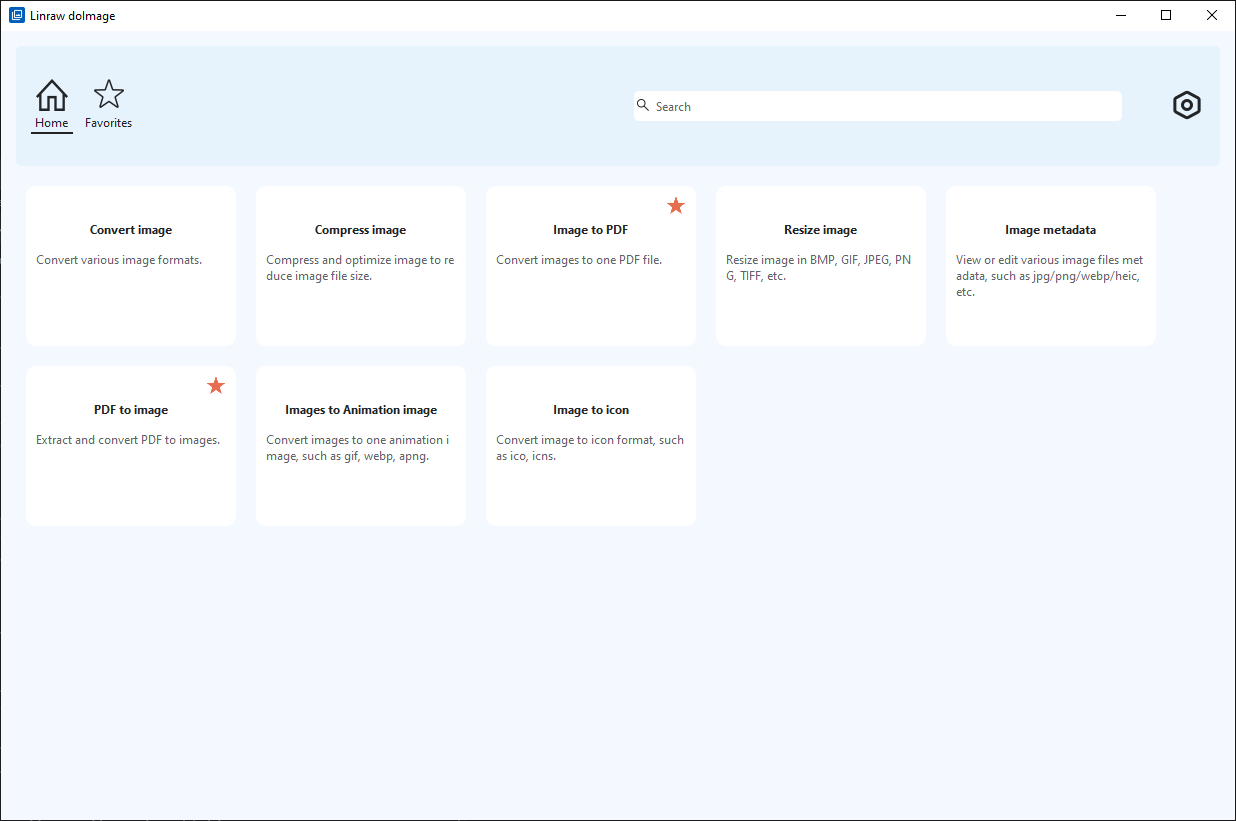
If you regularly work with downloaded icons, Linraw doImage is worth adding to your workflow. It is a multi-tool desktop utility for Windows and macOS that handles icon and image conversion locally — no file uploads, no internet connection required, no size limits.
The Image tool category inside Linraw doImage covers everything you need after downloading an icon:
Convert SVG → PNG, ICO, WebP in seconds
Batch-resize a folder of PNGs to multiple sizes at once
Generate multi-resolution ICO files from a single SVG source
Strip metadata from image files before publishing
Instead of uploading sensitive design assets to a random online converter, Linraw doImage runs everything on your own machine.
Free Icon Websites Compared at a Glance
| Site | Free Library Size | Formats | License | Attribution? | Best For |
|---|---|---|---|---|---|
| Flaticon | 16M+ icons | SVG, PNG, EPS, PSD | Flaticon License | Yes (free plan) | Marketers, content creators |
| Icons8 | 1.3M+ icons | SVG, PNG, PDF, Lottie | Icons8 License | Yes (free plan) | Consistent style systems |
| Noun Project | 5M+ icons | SVG, PNG | CC BY | Yes | Education, accessibility |
| Heroicons | 300+ icons | SVG, JSX | MIT | No | Tailwind / React developers |
| Feather Icons | 286 icons | SVG, PNG | MIT | No | Minimal, clean interfaces |
| Phosphor Icons | 7,000+ icons | SVG, PNG, Figma | MIT | No | Multi-weight design systems |
| Tabler Icons | 5,000+ icons | SVG, PNG, Webfont | MIT | No | Dashboards, admin panels |
| Bootstrap Icons | 2,000+ icons | SVG, Webfont | MIT | No | Bootstrap projects, web dev |
| Material Symbols | 3,000+ icons | SVG, Variable Font | Apache 2.0 | No | Android / Material Design |
| Ionicons | 1,300+ icons | SVG, Webfont | MIT | No | Mobile-first / Ionic apps |
| Remix Icon | 3,200+ icons | SVG, PNG, Webfont | Apache 2.0 | No | AI products, SaaS |
| Lucide Icons | 1,500+ icons | SVG, React, Vue, Svelte | ISC | No | Active Feather alternative |
| SVG Repo | 500,000+ SVGs | SVG, PNG, EPS, PDF | CC0 / MIT (varies) | Usually No | One-off & niche icons |
| Streamline | 100,000+ (free tier) | SVG, PNG, Figma | Streamline License | Check per icon | Professional UI designers |
| Iconduck | 100,000+ icons | SVG | Open source (varies) | Check per icon | Brand & tech-stack icons |
Which Icon Website Should You Choose?
| Use Case | Top Pick | Why |
|---|---|---|
| Developers | Heroicons / Tabler / Lucide | MIT licensed, npm packages, zero attribution |
| UI/UX Designers | Phosphor / Streamline | Weight variants, Figma plugins, premium quality |
| Marketers | Flaticon / Icons8 | Millions of icons, browser-based editing |
| Educators | Noun Project | Globally representative symbols |
| Mobile Apps | Ionicons / Material Symbols | Platform-aware, actively maintained |
| Niche Finds | SVG Repo / Iconduck | 100K–500K+ open-source icons |
Frequently Asked Questions
Are royalty-free icons really free to use commercially?
Yes — royalty-free means you pay no ongoing royalties per use. Most icons on the sites in this list are free for commercial use, though some require attribution or a paid upgrade to remove that requirement. Always check each site's specific license before publishing. "Free for personal use" and "royalty-free" are not the same — the former may bar commercial work entirely.
What is the difference between royalty-free and Creative Commons icons?
Royalty-free means no per-use fee is owed after an initial download. Creative Commons is a family of standardized open licenses. The most permissive is CC0 (public domain — no credit needed). CC BY requires you to credit the creator. CC BY-NC restricts commercial use. Always read the specific variant attached to an icon before using it commercially.
Do I need to credit the author when using free icons?
It depends on the license. MIT-licensed icons (Heroicons, Feather, Tabler, Phosphor, Bootstrap Icons, Lucide, Ionicons) require no end-user attribution. Apache 2.0 icons (Material Symbols, Remix Icon) need no credit either. CC0 icons (many on SVG Repo and Iconduck) also need none. Sites like Flaticon and The Noun Project require visible attribution on their free plans.
What icon format should I use for websites? (SVG vs PNG vs ICO)
SVG is the best format for websites: infinitely scalable, sharp on retina displays, editable in CSS, and typically the smallest file size. Use PNG as a fallback for email templates or SVG-incompatible environments. Use ICO only for browser favicons. WebP is worth considering for rasterized icons in image-heavy pages where load speed is critical.
Can I edit or recolor free icons for my project?
Generally yes, as long as the license permits derivative works. MIT and CC0 icons can be freely edited, recolored, resized, and incorporated into larger designs. Some proprietary licenses (Flaticon, Icons8 on the free plan) may restrict significant modification or redistribution of altered versions.
What is the best free icon website for developers?
For developers, the top three are Heroicons (MIT, Tailwind-native, JSX-ready), Tabler Icons (MIT, 5,000+ SVGs, CSS-customizable), and Lucide Icons (ISC, React/Vue/Svelte packages, tree-shakeable). All three require zero attribution and offer npm packages.
How do I convert icons between formats without online tools?
Linraw doImage is a free desktop utility for Windows and macOS that converts SVG, PNG, ICO, and WebP icons locally — no internet upload required. It supports batch processing, so you can convert and resize an entire folder of icons in one operation. This is particularly useful for generating multi-resolution ICO files for favicons or preparing multiple PNG sizes for app stores.
Conclusion
The icon ecosystem in 2026 is healthier than ever, with well-maintained MIT-licensed libraries giving developers zero-attribution icons for free, and large commercial platforms offering generous free tiers for designers and marketers.
Here is the quick summary by use case:
Best for developers: Heroicons, Tabler Icons, Lucide Icons — MIT licensed, npm-ready, no attribution.
Best for designers: Phosphor Icons, Streamline Icons — weight variants, Figma plugins, premium quality.
Best for large-scale variety: Flaticon, Icons8 — millions of icons, browser-based editing, commercial options available.
Best for niche or obscure icons: SVG Repo, Iconduck — aggregators with 100,000–500,000+ open-source icons.
Best for mobile platforms: Ionicons, Material Symbols — platform-aware, actively maintained by Ionic and Google.
One last practical tip: once you have downloaded your icons, use a local tool like Linraw doImage to convert formats, resize batches, and generate favicon ICO files — all without uploading your assets to a third-party server.
However, if your workflow involves multiple types—such as images, audio, video, PDFs, or eBooks—then Linraw doUltra is a more powerful all-in-one option.
Related Chapters
